
The Ultimate Spring HVAC Maintenance Checklist for Coastal Texas
Learn how to make sure your ac survives a texas summer with our ultimate spring HVAC checklist for coastal Texas heat, maintenance tips & warnings.
Your AC and a Texas Summer: What Every Houston-Area Homeowner Needs to Know
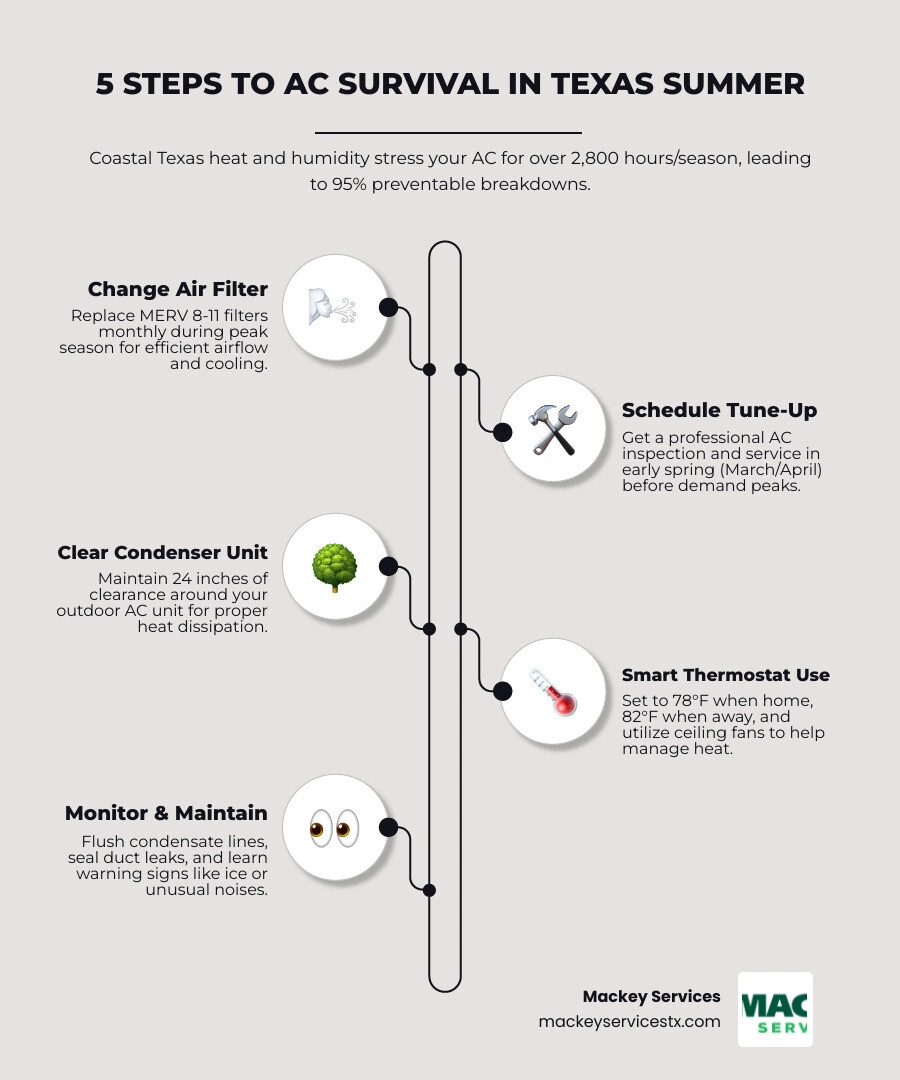
How to make sure your AC survives a Texas summer comes down to a handful of proven steps you can start right now, before the heat arrives:
- Replace your air filter every 30 days during peak season (MERV 8-11 rating recommended)
- Schedule a professional tune-up in early spring — March or April — before the summer rush
- Clear 24 inches of space around your outdoor condenser unit
- Set your thermostat to 78°F when home, 82°F when away
- Flush your condensate drain line monthly with white vinegar
- Seal duct leaks and check attic insulation to stop cooled air from escaping
- Know the warning signs — ice on lines, unusual noises, and rising indoor temps all mean trouble
This matters more in coastal Texas than almost anywhere else in the country. The greater Houston area averages daytime highs near 98°F, and your AC will run 12 to 16 hours a day from June through September. That adds up to more than 2,800 hours of operation over a single summer — equivalent to four straight months of continuous use. In comparison, most northern states see just 3 to 4 months of AC use per year.
Here in Dickinson and the surrounding communities, the Gulf Coast humidity makes it even harder on your system. Your AC doesn't just cool your home — it pulls moisture out of the air around the clock. In a humid coastal climate, a system can remove up to 20 gallons of water from the air every single day. That kind of workload wears down components fast. And when temperatures push past 100°F, your system physically cannot cool your home more than 20 to 25 degrees below the outdoor temperature — no matter how low you set the thermostat.
The good news? According to industry data, 95% of summer AC breakdowns are completely preventable with proper spring maintenance. A small problem caught in April is a quick, affordable fix. The same problem ignored until July — when every HVAC company in the Houston area has a two-week wait — can turn into a costly emergency or even a full system replacement.
Why Coastal Texas Heat Puts Extreme Strain on HVAC Systems

Living in places like Galveston, Seabrook, or League City means we aren't just dealing with heat; we are dealing with a "double threat" of high temperatures and intense Gulf Coast humidity. In April 2026, as we look toward another season of triple-digit days, it’s important to understand why our systems struggle more than those in other states.
The primary issue is heat saturation. Most residential AC systems are designed to maintain about a 20-degree difference between the outside air and your indoor setting. When the thermometer hits 105°F, your system is reaching its physical limits just to keep your living room at 80°F. During these stretches, the compressor never gets a break.
Furthermore, the salt air in our coastal communities is a silent equipment killer. This environment accelerates how salt air and humidity shorten AC lifespan by corroding the delicate aluminum fins on your outdoor condenser. When these fins degrade, the unit can't release heat efficiently, leading to common reasons AC stops cooling in extreme heat.
In Texas, your AC runs for 2,800+ hours a year. That is the equivalent of driving a car at 60 mph for 168,000 miles every single year. Without a "tune-up," no machine can survive that kind of equipment stress without eventually failing.
How to Make Sure Your AC Survives a Texas Summer
To win the battle against the heat, you need a plan. We recommend a "Spring Training" approach for your HVAC system. By following a specific timeline, you can ensure your home stays a sanctuary rather than a sauna.
- March: This is the time for DIY prep. Inspect your filters, clear the area around your outdoor unit, and test your system on a warm afternoon to see if it reaches the set temperature.
- April: Schedule your professional servicing. This is the "sweet spot" before the 100-degree days hit and HVAC schedules fill up.
- May: Verification month. Ensure any repairs recommended in April are completed. Check your attic insulation and seal any visible duct leaks.
For a deeper dive into local maintenance needs, check out our AC Maintenance Baytown TX Complete Guide.
DIY Maintenance: How to Make Sure Your AC Survives a Texas Summer
You don't need a toolbox full of specialized gear to help your system. There are three major things every homeowner in Pearland or Friendswood should do:
- The 30-Day Filter Rule: During a Texas summer, ignore the "90-day" label on the box. Your system is moving so much air that filters clog much faster. We recommend a MERV 8 to MERV 11 rating. These provide a great balance of capturing dust and pollen without "suffocating" your AC's airflow.
- The 24-Inch Clearance Rule: Your outdoor condenser needs to "breathe" to release heat. Keep plants, mulch, and debris at least 24 inches away from the unit on all sides. If the unit is crowded, the compressor will overheat and likely fail.
- The Vinegar Flush: Our humidity means your AC produces 5 to 20 gallons of water daily. This water travels through a narrow PVC drain line. Over time, algae and "slime" can grow, causing a backup. Pouring a cup of white vinegar down the condensate drain line monthly can prevent a messy overflow. If you're wondering, are air conditioners supposed to leak water? Understanding AC condensation and leak issues Greater Houston will help you distinguish between normal operation and a dangerous clog.
Professional Tune-ups: How to Make Sure Your AC Survives a Texas Summer
While DIY steps are great, some things require a pro. A professional tune-up is like an oil change for your home's most expensive appliance. During a visit, a technician will check:
- Capacitor Health: The capacitor is the #1 failure point during heatwaves. It’s the "battery" that helps your motor start. If it's bulging or weak, it will die the moment it hits 100°F.
- Refrigerant Charge: A system that is even slightly low on refrigerant will work twice as hard to produce half the cooling.
- Electrical Connections: Heat causes wires to expand and contract, which can loosen connections and lead to electrical fires or component failure.
- Coil Cleaning: Dirty coils act like a thermal blanket, trapping heat inside your system.
Investing in these checks provides massive benefits of routine AC maintenance. If your system is already struggling, it's better to consult an AC Repair Seabrook TX Complete Guide sooner rather than later.
Optimizing Your Home for Triple-Digit Efficiency
Your AC shouldn't have to fight the sun alone. You can significantly reduce the load on your system by making small adjustments to your home environment.
The 78-Degree BaselineThe Department of Energy recommends setting your thermostat to 78°F when you are home. We know that sounds warm to some, but remember: every degree you set the thermostat below 78°F increases your energy usage by about 8%. If you're used to 72°F, you're paying nearly 50% more on your cooling bill!
The Wind-Chill EffectCeiling fans are your best friend. Ensure they are rotating counterclockwise to push air straight down. This creates a wind-chill effect that makes you feel up to 4 degrees cooler. Just remember: fans cool people, not rooms. Turn them off when you leave the room to save electricity.
Blocking the HeatApproximately 40% of unwanted heat enters your home through windows. Using blackout curtains or solar screens on south and west-facing windows can drop your indoor temperature by several degrees. Additionally, check your attic. Proper insulation can save homeowners up to 40% on cooling costs by keeping the 150°F attic air from seeping into your living space.
| Thermostat Setting | Energy Usage Impact | Estimated Savings |
|---|---|---|
| 72°F | Very High Strain | 0% (Baseline for high cost) |
| 75°F | Moderate Strain | 24% Savings vs 72°F |
| 78°F | Optimal Efficiency | 48% Savings vs 72°F |
| 82°F (Away) | Low Strain | 10% Additional Annual Savings |
Warning Signs Your System is Struggling
Knowing how to make sure your AC survives a Texas summer also means knowing when it’s waving a white flag. AC systems typically fail between days 8 and 15 of a sustained heatwave. Watch for these red flags:
- Frozen Coils: If you see ice on the copper lines leading to your outdoor unit, stop! Turn the system off immediately. This is usually caused by a dirty filter or low refrigerant. If you find yourself in this spot, read what to do when your AC unit freezes up.
- Unusual Noises: Squealing, grinding, or loud banging are signs of mechanical failure.
- Short Cycling: If the AC turns on and off every few minutes, it’s not removing humidity and is putting massive strain on the compressor.
- The 20-Degree Rule: Use a digital thermometer to measure the air coming out of your vent versus the air going into your return intake. There should be a 15-20°F difference. If the air at the vent is only 5 degrees cooler than the room, your system is failing.
If you notice these signs, don't wait. Ask yourself, why is my AC running but not cooling? Getting a professional out early can save the compressor, which is the most expensive part of the system.
Frequently Asked Questions
How often should I change my filter during a Houston summer?
You should perform a monthly inspection at minimum. If you have pets, kids, or allergies, you may need to change it every 3 weeks. During high-demand periods (July and August), your AC runs nearly 24/7, meaning it processes three times as much dust as it does in the spring.
Why does my AC run constantly when it is 100 degrees outside?
This is often due to "thermal gain" and heat saturation. When it is 100°F+ outside, heat is seeping through your walls, windows, and attic faster than the AC can remove it. As long as your home is staying at your set temperature, constant running is normal for Texas. However, if the indoor temperature is rising despite the AC running, you have an efficiency or mechanical issue.
Should I turn my AC off when I leave for work?
No! This is a common mistake that leads to "heat-soak." When you turn the AC off, your furniture, walls, and floors absorb the Texas heat. When you get home and turn it back on, the system has to work for hours just to cool down your sofa before it can even start on the air. Instead, use a "7-degree offset." If you like it at 75°F, set it to 82°F while you're away.
Conclusion
Surviving a Texas summer requires more than just luck; it requires a proactive partnership between you and your HVAC system. By handling the simple DIY tasks like filter changes and drain flushes, and trusting the experts for the technical "heavy lifting," you can ensure your home remains a cool haven all summer long.
At Mackey Services, we’ve spent 30 years helping our neighbors in Dickinson, League City, Friendswood, and across the Greater Houston Area stay comfortable. As a family-owned business with an A+ BBB rating, we treat your home like our own. Whether you need a spring tune-up, a custom ductwork solution, or 24/7 emergency repair, we are here to ensure your peace of mind.
Don't wait for the first 100-degree day to find out if your system is ready. Schedule your professional AC maintenance today and beat the heat before it beats you.
Ready for a better day?
One call handles it all — HVAC, electrical, and generators across the Texas Gulf Coast. Less to pay. Better day. That's the Mackey way.
Mon–Fri: 7 AM – 8 PM · Sat: 8 AM – 5 PM · Licensed & insured · #TACLA 112769C · #TECL 558211