
When Upgrading to a Smart Thermostat Actually Increases Your Cooling Bill
Get clear answers on when upgrading to a smart thermostat actually increases your cooling bill. See why factory defaults clash with variable-speed AC units.
The Myth of Plug-and-Play Energy Savings
Smart thermostats are heavily marketed as guaranteed money savers right out of the box, promising effortless efficiency the moment they are powered on. However, in our years of serving the Dickinson area, we have found that when upgrading to a smart thermostat actually increases your cooling bill, the culprit is rarely a defective device. Instead, it is usually a fundamental mismatch between the software's default settings and your specific hardware. If you want to get the most out of your air conditioning systems, properly matching the thermostat's algorithm to the physical compressor is the critical first step.
At Mackey Services, our team sees the exact opposite of what the box promises: rising energy consumption, sudden spikes in utility usage, and an AC unit that sounds louder and runs more aggressively than before. This frustration peaks during the August late-summer heat, right as families are gearing up for the back-to-school transition, when cooling systems are pushed to their absolute limits and any inefficiency becomes immediately noticeable in both your comfort and your monthly statement.
The root cause of this problem is that default smart algorithms are designed to cool spaces as fast as possible. They want to drop the temperature quickly to hit a scheduled target, which directly contradicts the careful, energy-sipping design of modern high-efficiency cooling equipment. Rather than saving power, these aggressive software commands force your advanced hardware to abandon its most efficient operating modes, leading to unnecessary wear and tear alongside higher energy demands.
Understanding the 'Low and Slow' Design of Modern Cooling Systems
To understand why a smart thermostat can cause problems, you first have to understand how modern variable-speed HVAC systems are built to operate. Traditional, older single-stage air conditioners have only two speeds: completely off, or blasting cold air at 100% capacity. When the house gets warm, they kick on with a massive surge of electricity, run at full blast until the target temperature is reached, and then shut down completely.
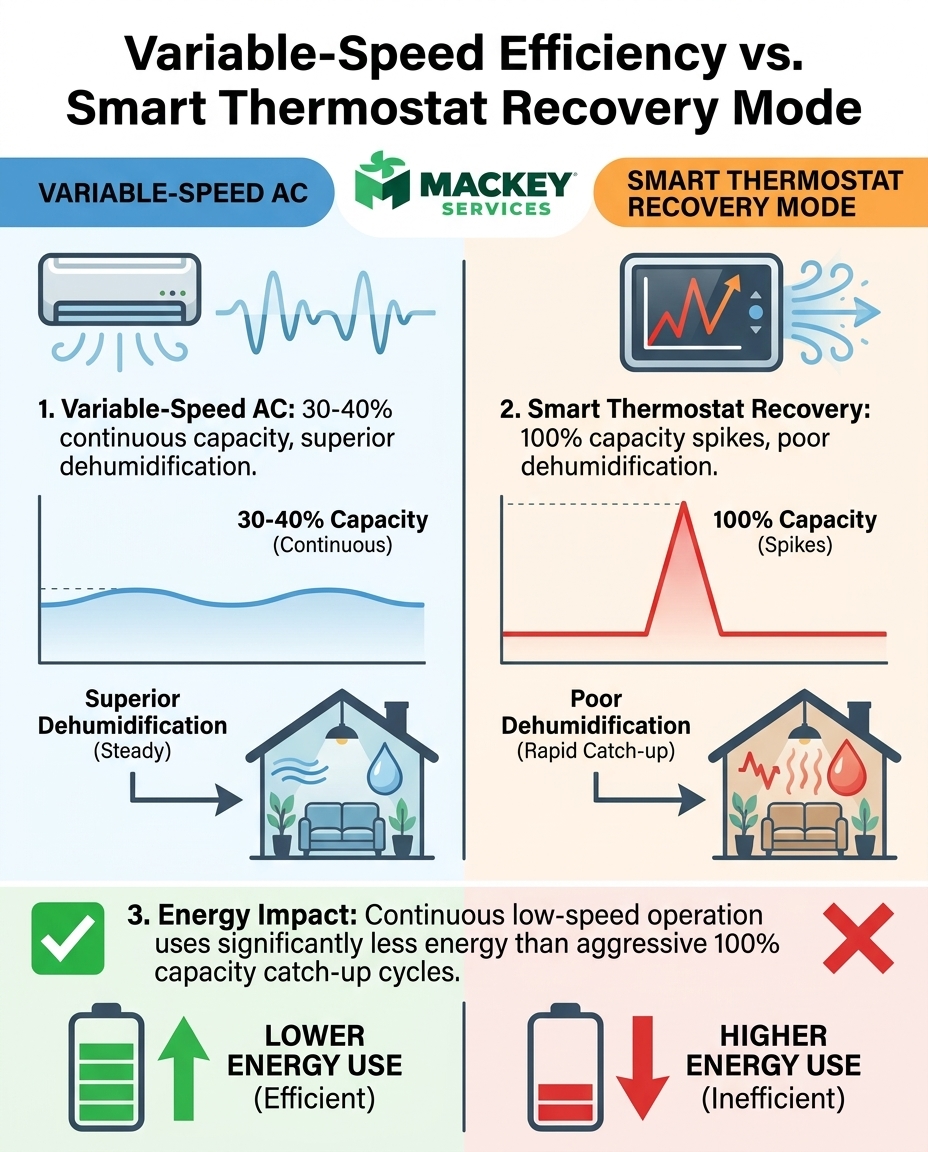
Modern variable-speed systems take the exact opposite approach. They are designed to run continuously at much lower capacities, often hovering between 30% and 40% of their maximum power. Think of it like driving a car on the highway at a steady 60 miles per hour, rather than constantly slamming on the gas and then hitting the brakes in stop-and-go city traffic.
- Continuous operation: Running steadily at a low speed prevents the massive electrical spikes required to jump-start a heavy compressor.
- Superior dehumidification: Slower airflow gives the system more time to pull moisture out of your indoor air.
- Even temperatures: Constant, gentle air circulation eliminates hot and cold spots throughout the house.
- Quieter cycles: Operating at 30% capacity means the blower motor and compressor generate a fraction of the noise.
This continuous, low-speed operation is significantly more energy-efficient than short, aggressive bursts of maximum power. A recent end-of-season installation by our Mackey Services crew highlighted this perfectly. A Dickinson homeowner struggling with severe asthma replaced two inefficient, aging units with a new 19-SEER variable-speed system and HEPA filtration. Because our technicians properly configured the new equipment to run continuously at a low speed, the family saw a massive reduction in energy consumption while achieving vastly superior air quality and humidity control. The system was allowed to operate exactly as the engineers intended.
The Conflict: Smart Thermostat Recovery Modes vs. Variable-Speed Compressors
The technical clash happens when you connect a highly advanced variable-speed compressor to a smart thermostat that is using basic, aggressive logic. Almost all smart thermostats feature "recovery modes" (sometimes called Smart Recovery or Early Start). These features are designed to let the house get warm while you are at work, and then drop the indoor temperature rapidly right before you get home.
To achieve these rapid temperature drops—say, pulling the house from 78 degrees down to 72 degrees in just forty-five minutes—the thermostat commands the HVAC system to operate at 100% capacity. It demands maximum cooling power immediately. Forcing a variable-speed compressor to run at maximum capacity completely negates its energy-saving design.
Instead of sipping power all afternoon to maintain a steady temperature, the system is forced to gulp massive amounts of electricity during peak heat hours to catch up. This algorithmic "catch-up" mode overrides the compressor's ability to stage itself efficiently, turning a premium, high-efficiency unit into a loud, power-hungry machine.
Comparing Cooling Strategies
| Feature | Variable-Speed Hardware Logic | Smart Thermostat Default Logic |
|---|---|---|
| Primary Goal | Maintain temperature slowly and steadily. | Recover temperature as quickly as possible. |
| Capacity Usage | Runs continuously at 30% to 40% capacity. | Demands 100% capacity for rapid cooling. |
| Energy Impact | Sips power, avoiding large startup surges. | Gulps power during peak afternoon heat. |
| Dehumidification | Excellent (long, slow cycles remove moisture). | Poor (short, fast cycles leave moisture behind). |
Why High Humidity Amplifies the Inefficiency
Our technicians know firsthand that this software-to-hardware mismatch is particularly punishing in Gulf Coast climates. Here in Dickinson TX, the extreme late-summer humidity necessitates long, slow variable-speed cycles for optimal moisture removal. It is not just about the temperature on the wall; it is about the heavy, thick moisture in the air.
Latent heat (the scientific term for humidity) makes a home feel significantly hotter than the actual temperature reading. Removing this humidity requires the indoor air to pass slowly over the cold indoor evaporator coil for extended periods. The longer the air is in contact with the coil, the more moisture is pulled out and drained away.
When a smart thermostat forces aggressive, high-speed cooling, it pushes massive volumes of air over the coil very quickly. This drops the sensible heat (the number on the thermostat) rapidly, satisfying the thermostat's target in a short amount of time. The system then shuts off. Because the cycle was so short and fast, the system cooled the air but failed to remove enough moisture.
The result is a cold but clammy home. The air feels damp, and you might notice condensation on windows or a heavy feeling in the rooms. To combat this uncomfortable swamp-like feeling, homeowners inevitably lower the temperature even further—pushing the thermostat down to 68 or 69 degrees just to feel dry. This secondary adjustment drives up energy consumption astronomically, all because the initial cooling cycle was too fast to handle the Dickinson humidity.
The Hidden Cost of Factory Default Settings
Homeowners often assume that smart devices are perfectly optimized straight out of the box. However, manufacturers design their default settings to be compatible with the most common, basic HVAC systems on the market. Since older, single-stage air conditioners are still highly prevalent, smart thermostats are shipped with settings optimized for that older technology.
Features like "Smart Recovery" or "Early Start" are enabled by default because they work well for a single-stage compressor that only knows how to run at 100% anyway. We frequently visit homes where well-meaning homeowners installed these devices themselves, completely unaware that leaving these default settings active on advanced, multi-stage equipment is actively costing them money.
Proper scheduling strategies must account for the specific staging capabilities of the connected equipment. While it is true that learning how smart thermostats reduce summer energy costs is valuable, those savings rely entirely on proper setup. If your thermostat does not know it is connected to a variable-speed compressor, it will not send the correct low-voltage signals to utilize those lower, efficient speeds. Instead, it will bypass the efficient stages entirely and command maximum output every time it senses a temperature gap.
Aligning Thermostat Algorithms with Multi-Stage Equipment
The critical decision point for homeowners is whether to keep the aggressive setback schedules (letting the house get very warm while away and cooling it down rapidly) or to configure the thermostat to respect variable-speed operations. For modern equipment, the best strategy is often setting a much narrower temperature band. Instead of a 6-degree swing, you might only allow a 2-degree swing, allowing the variable-speed system to sip power all day and maintain perfect humidity.
This configuration applies not just to traditional air conditioners, but to advanced heating solutions as well, including heat pump installations (which may qualify for general federal tax credits or local utility incentives, so be sure to check current programs with your utility provider). These advanced systems also rely on long, steady cycles to maximize their energy transfer efficiency. Disabling aggressive recovery features and adjusting the cycle rate allows advanced equipment to operate exactly as intended.
In another case, our team was called to a newly built Dickinson house where the homeowner experienced persistent, unexplained eye and skin irritation. Our inspection revealed that while the home had top-tier equipment, the thermostat was misconfigured. The system was short-cycling, rapidly dropping the temperature but failing to manage the indoor humidity, leading to poor air quality. Once our technicians corrected the staging thresholds and allowed the system to run in its proper low-and-slow mode, the indoor environment stabilized, resolving the irritation entirely.
Deep system configuration often requires accessing installer-level menus to match staging thresholds with physical equipment capabilities. This is exactly where our team at Mackey Services steps in as your local technical authority, bridging the gap between smart software and physical variable-stage HVAC equipment. Adjusting these deeper staging differentials, wire assignments, and cycle rates goes far beyond the basic user app and requires a professional understanding of the equipment's internal control board.
Frequently Asked Questions About Thermostat Upgrades and Energy Use
Why is my electric bill higher after installing a smart thermostat?
Your bill may be higher because the thermostat's default settings are forcing your system to work inefficiently. If you have a variable-speed or two-stage air conditioner, default "recovery modes" often force the system to run at 100% capacity to achieve rapid temperature drops. This bypasses the energy-saving lower speeds your system was designed to use, causing it to consume significantly more electricity during peak hours.
How does recovery mode affect variable-speed AC?
Recovery mode negatively impacts variable-speed AC by demanding maximum power instead of gradual cooling. Variable-speed units save energy by running continuously at 30% to 40% capacity. When a smart thermostat activates recovery mode to cool a house quickly before you get home from work, it commands the compressor to ramp up to maximum speed, negating the system's built-in efficiency and dehumidification benefits.
Should I turn off recovery mode on my thermostat?
If you own a multi-stage or variable-speed HVAC system, our team generally recommends disabling aggressive recovery modes. Turning off features like "Smart Recovery" or "Early Start" prevents the thermostat from forcing the system into high gear. Instead, use a narrower daily temperature schedule (only changing the temperature by a few degrees) so your advanced equipment can maintain comfort using its lowest, most efficient speeds.
Do smart thermostats run the AC more?
Smart thermostats do not inherently run the AC more, but improper settings can cause erratic running patterns. If the "cycle rate" or "swing" settings are configured too tightly, the thermostat might turn the AC on and off too frequently (short-cycling). Conversely, if it is trying to overcome a massive temperature setback in the late afternoon, it will run the AC at maximum capacity for a prolonged, energy-draining period.
What is recovery mode on a thermostat?
Recovery mode is a software feature that learns how long your home takes to heat or cool, and starts the system early to reach a scheduled temperature on time. For example, if you schedule the house to be 72 degrees at 5:00 PM, recovery mode might turn the AC on at full blast at 3:30 PM. While convenient, this aggressive catch-up strategy is highly inefficient for modern variable-speed equipment.
How do I know if my thermostat is properly configured for a multi-stage compressor?
You can usually tell by listening to your system and monitoring your indoor humidity. If your AC always sounds like it is running at maximum volume, or if your home feels cold but clammy and humid, the staging is likely misconfigured. Proper configuration requires accessing the installer-level setup menus on the thermostat to ensure the software matches the specific wiring and staging capabilities of your outdoor unit.
Ensure Your Smart Thermostat Actually Saves You Money
A smart thermostat is an incredible piece of technology, but it is only as efficient as the configuration matching it to your physical equipment. If you simply mount it to the wall and accept the factory defaults, you risk actively working against the advanced engineering of your modern cooling system.
Our team at Mackey Services recommends you stop letting aggressive default settings override your high-efficiency AC. By letting professionals properly align the software with your hardware, you can enjoy the convenience of smart controls without sacrificing the low-and-slow dehumidification your home needs. Professional configuration ensures your system operates smoothly, maintaining perfect comfort without triggering massive energy spikes. If you want to guarantee your system is running at peak performance year-round, securing a comprehensive HVAC maintenance plan is the best way to keep your hardware and software working in perfect harmony.
Ready for a better day?
One call handles it all — HVAC, electrical, and generators across the Texas Gulf Coast. Less to pay. Better day. That's the Mackey way.
Mon–Fri: 7 AM – 8 PM · Sat: 8 AM – 5 PM · Licensed & insured · #TACLA 112769C · #TECL 558211